常见问题解答
7.0.2
7.0.2
7.0.1
Here is a curated reading list from the official CiteSpace blog to help you get started as a beginner or catch up on the latest advanced features as an experienced user:
"What Do CiteSpace Visualizations Mean?" (August 2026)
This is the ultimate foundational guide to understanding the software's unique "visual language". It breaks down how to interpret visual patterns like nodes, structural clusters, and citation bursts to make sense of your data maps.
"Broad Overviews" (2024–2025)
Perfect for your first project. It details how to quickly generate high-level, circular, and landscape visualizations to map out the scope of subject categories within any brand-new dataset.
"CiteSpace 7.0 Overview" (January–August 2026)
Essential for updating your toolkit. This tracks major 2026 releases (v7.0.0 and v7.0.1), highlighting newly introduced UMAP and Circular-Spiral layouts, Scopus conversion fixes, and the restoration of structural variation analysis (SVA).
"Context-Aware and High-Quality Cluster Summarization" (March 2025)
To learn how to leverage large language models (LLMs) like GPT-4o and DeepSeek directly within CiteSpace. It explains how the built-in system now uses AI to generate highly precise thematic syntheses and keyword suggestions for your clusters.
"What's New in Advanced Features: Geocoding Updates"
Crucial if you use geographic mapping features. It covers critical technical changes to the Google Earth KML mapping feature, specifically how to set up your own API key environment variable.
When analyzing a network visualization generated by CiteSpace, there are several key visual patterns and elements to pay special attention to:
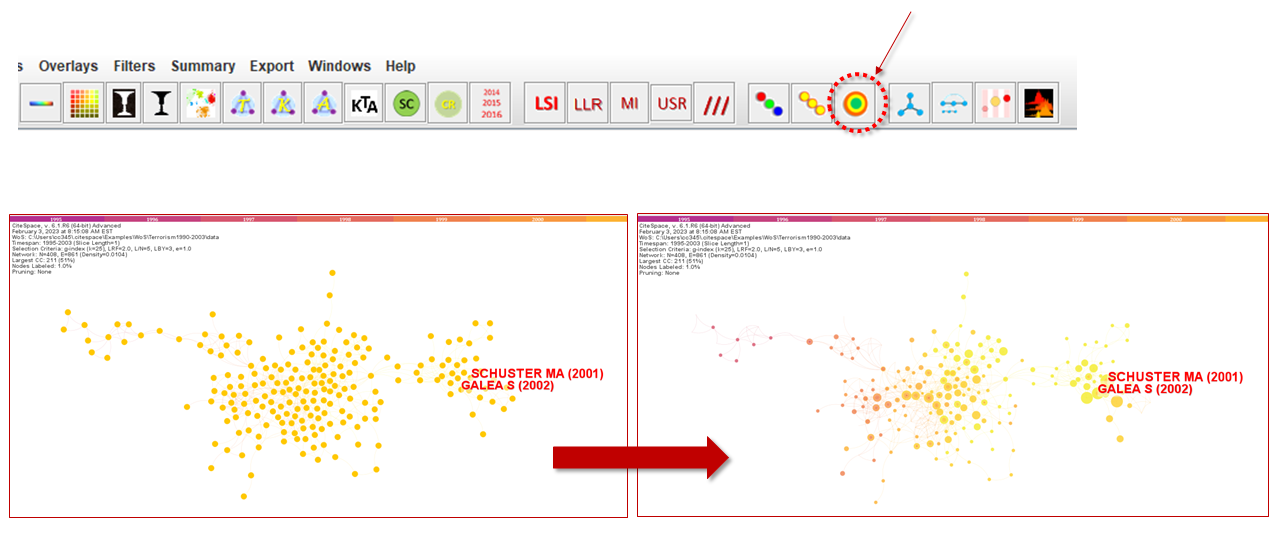
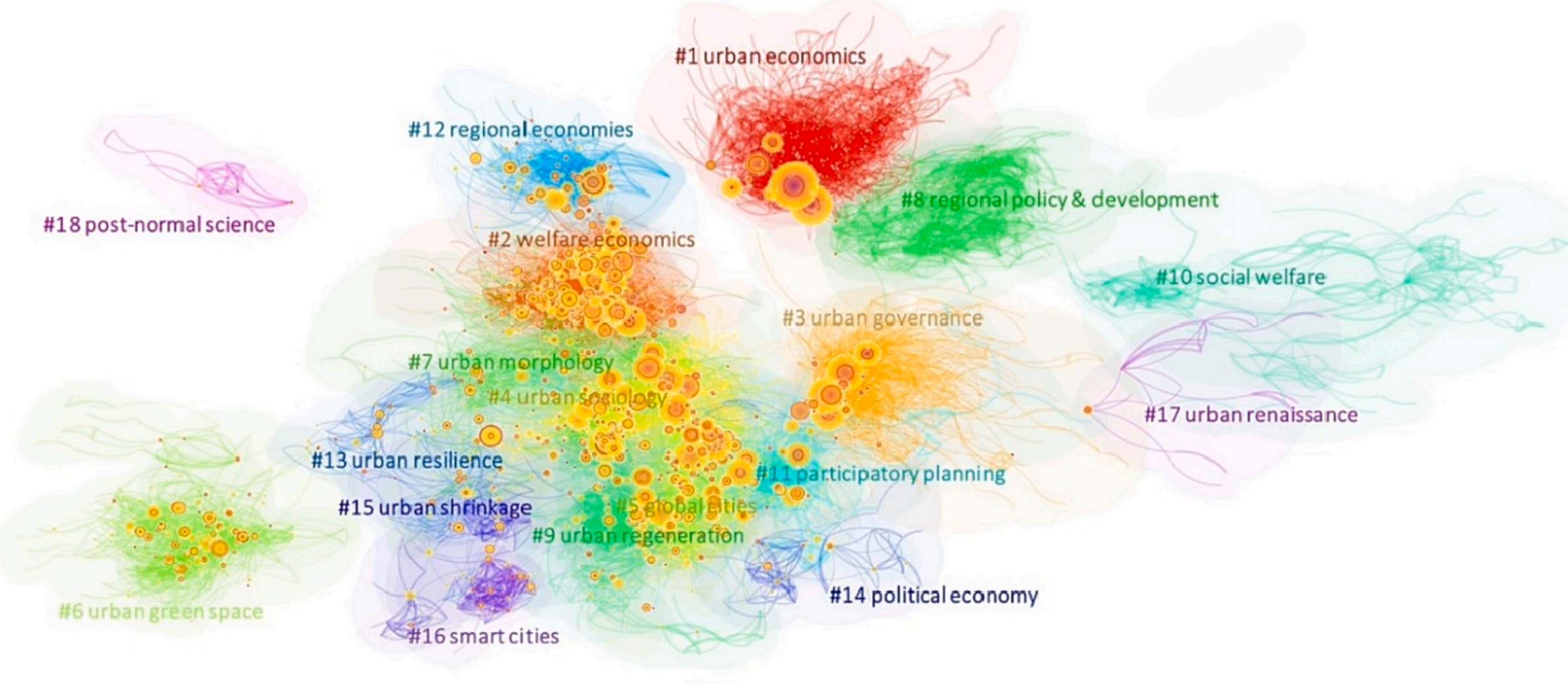
1. Clusters: Clusters are groups of closely related nodes. They often represent a specific theme or topic within the broader research area. Larger clusters typically indicate more research activity or interest in that particular area.
2. Node Size: The size of a node usually indicates its importance or prominence in the network. Larger nodes might represent highly cited papers, influential researchers, or key concepts.
3. Node Color and Tree Rings: The color of nodes and the presence of tree rings (especially red rings) can be significant. The color often represents the time frame of the publication or the emergence of a concept. Red tree rings indicate citation bursts, suggesting that the work has received increasing attention over a specific period.
4. Links Between Nodes: The connections or links between nodes show relationships, such as co-authorship, co-citation, or thematic similarity. The strength and number of these links can indicate the degree of association.
5. Time Axis or Temporal Distribution: Many CiteSpace visualizations have a time component, showing the evolution of the field over time. This can help identify trends, emerging areas, or shifts in research focus.
6. Structural Holes: Places in the network where there are gaps between clusters can indicate areas of potential innovation or interdisciplinary opportunities, as they may represent underexplored connections between different fields or concepts.
7. Modularity and Silhouette Values: These metrics, if provided, can give insights into the network's structure. High modularity indicates well-defined clusters, while silhouette values can suggest the coherence or reliability of the clustering.
8. Labels and Annotations: Descriptive labels on nodes or clusters provide contextual information, helping to quickly understand what each element represents.
Understanding these elements in the context of your specific research or area of interest can yield valuable insights into the structure and dynamics of the scientific landscape you are exploring.
当分析由CiteSpace生成的网络可视化时,有几个关键的可视化形式和特征需要特别注意:
1. 聚类(Clusters):聚类是一组紧密相关的节点。它们通常代表在更广泛的研究领域内的特定主题或话题。较大的聚类通常表示在该特定领域的研究活动或兴趣更为集中。
2. 节点大小(Node Size):节点的大小通常表示其在网络中的重要性或突出性。较大的节点可能代表高引用论文、有影响力的研究人员或关键概念。
3. 节点颜色和树环(Node Color and Tree Rings):节点的颜色和树环的存在(特别是红色环)可能很重要。颜色通常代表出版物的时间框架或概念的出现。红色树环表示引文突增,表明该工作在特定时期内获得了越来越多的关注。
4. 节点间的链接(Links Between Nodes):节点间的连接或链接显示了关系,如合著、共引或主题相似性。这些链接的强度和数量可以表示关联程度。
5. 时间轴或时间分布(Time Axis or Temporal Distribution):许多CiteSpace可视化具有时间组件,显示了该领域随时间的演变。这可以帮助识别趋势、新兴领域或研究重点的转变。
6. 结构洞(Structural Holes):网络中聚类之间的间隙表明了潜在的创新或跨学科机会,因为它们可能代表了不同领域或概念之间未被充分探索的连接。
7. 模块化和轮廓值(Modularity and Silhouette Values):如果提供了这些指标,可以对网络的结构提供洞察。高模块化表示定义良好的聚类,而轮廓值可以提供聚类的一致性或可靠性。
8. 标签和注释(Labels and Annotations):节点或聚类上的描述性标签提供了背景信息,有助于快速理解每个元素代表的内容。
在您特定的研究或兴趣领域的背景下理解这些元素,可以为您探索的科学领域的结构和动态提供宝贵的洞察。
Check the FAQs
Ask the CiteSpace Official Support Assistant GPT
email info.citespace@gmail.com
Please describe issues you are encountering in detail, including error messages, screenshots, and crash reports, so that we can identify the cause of the problem. Try to send more specific messages instead of "The function X doesn't work" or "I can't install the new version". Please include the following information in your inquiry:
What is your operating system? Windows 11 or Mac Sequoia 15 or Ubuntu 24.04?
Which version of CiteSpace and the built date?
What are the steps to reconstruct the error you encountered
Any error messages in the console
if possible, include screenshots of the main interface and the project properties
有问题时请先查看常见问题解答(FAQ) 以及CiteSpace official Support Assistant GPT里是否已有同样问题的解决办法。
请提供尽可能详细的信息,避免像“功能 X 不起作用”或“我无法安装新版本”这样过于空泛的留言。
操作系统:Windows、Mac
CiteSpace版本和建成日期
问题出现之前的具体步骤
任何提示出错的信息,详细报告
相关屏幕截图或录屏
RAM: 4MB or more
CiteSpace installers assume your computer has at least 4MB RAM. If you have fewer RAM, you need to modify the configuration file (See below)
内存:4MB或以上
CiteSpace 安装程序假定您的计算机至少有 4MB RAM。如果你的RAM较少,则需要修改配置文件(见下文)
Java 21 or higher
If you don't have any version of Java installed on your computer, you don't need to do anything. CiteSpace installers will take care of it.
If you have installed Java below 17, you need to uninstall Java. Note this may impact on your other Java applications.
Java 21 或更高版本
如果您的计算机上没有安装任何版本的 Java,则无需另行安装Java。 CiteSpace 安装程序就足够了。
如果您已安装 Java 17 或更高版本,也不需要改动。
但是如果您安装了17以下的Java,则需要卸载Java。请注意,这可能会影响您的其他 Java 应用程序对Java版本的要求。
CiteSpace is available through three subscription plans:
Standard: 1-year subscription for 1 computer
Intermediate: 1-year subscription for up to 2 computers
Advanced: 2-year subscription for up to 2 computers
With a valid subscription, you may install, activate, and update any currently supported version of CiteSpace during your subscription period. The subscription is tied to the activated computer(s) and cannot be transferred to different computers.
Due to our limited support resources, the previously available Basic (free) version is no longer offered.
If you would like a quick overview of how CiteSpace works, please watch this introductory video.
CiteSpace 目前提供三种订阅方案:
Standard(标准版):1 年,可在 1 台电脑上使用
Intermediate(中级版):1 年,可在最多 2 台电脑上使用
Advanced(高级版):2 年,可在最多 2 台电脑上使用
在订阅有效期内,您可以安装、激活并更新当前支持的任意版本的 CiteSpace。订阅与已激活的电脑绑定,不能转移到其他电脑使用。
由于技术支持资源有限,我们已停止提供此前免费的 Basic(基础版)。
如果您希望快速了解 CiteSpace 的基本功能和使用方法,请参考演示视频。
Credit cards, Alipay, WeChat Pay are accepted using the payment links below. A valid email address is required for you to receive instructions and for activation and validation purposes.
You will receive an email with confirmations and instructions after your payment. If you haven't received the email, please check your spam folder.
Standard: AliPay/WeChatPay
Intermediate: AliPay/WeChatPay
Advanced: AliPay/WeChatPay
支付方式
付款方式包括信用卡,微信或支付宝。付款过程中务必提供准确的邮箱地址,随后的激活验证都需要用到这个地址。
付款后相关注册链接及收据会送到你的邮箱。如果没有收到邮件,请检查你的垃圾邮件。
支付宝/微信付款链接
标准会员: AliPay/WeChatPay
中级会员: AliPay/WeChatPay
高级会员: AliPay/WeChatPay
特别提醒:除本网站之外,任何其它出售CiteSpace的网站均未经授权。注意辨别。
Register 注册
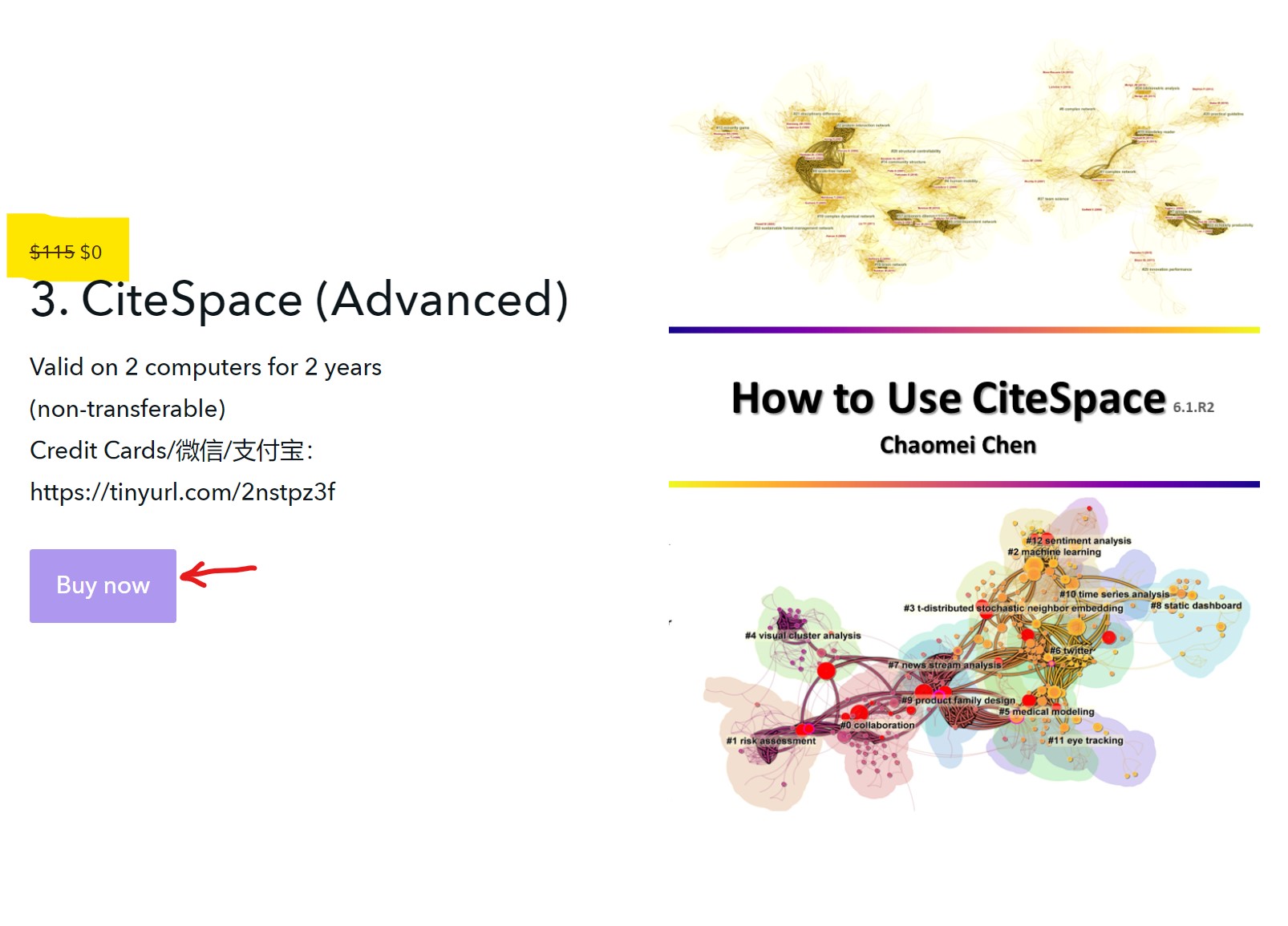
There are a few more steps you need to follow after a wechat pay or alipay. A special link will be emailed to you so that you can complete the registration process without any additional cost. The link will take you the product page. You should see "Free" next to a strikethrough on $. Then click on the "Buy Now" button to proceed free of charge.
用微信或支付宝付款后你会收到下一步的邮件以完成注册。整个过程不需要再付费。注意红色箭头所指处显示为 Free。再按Buy Now按钮继续即可。沿途不需再缴费。
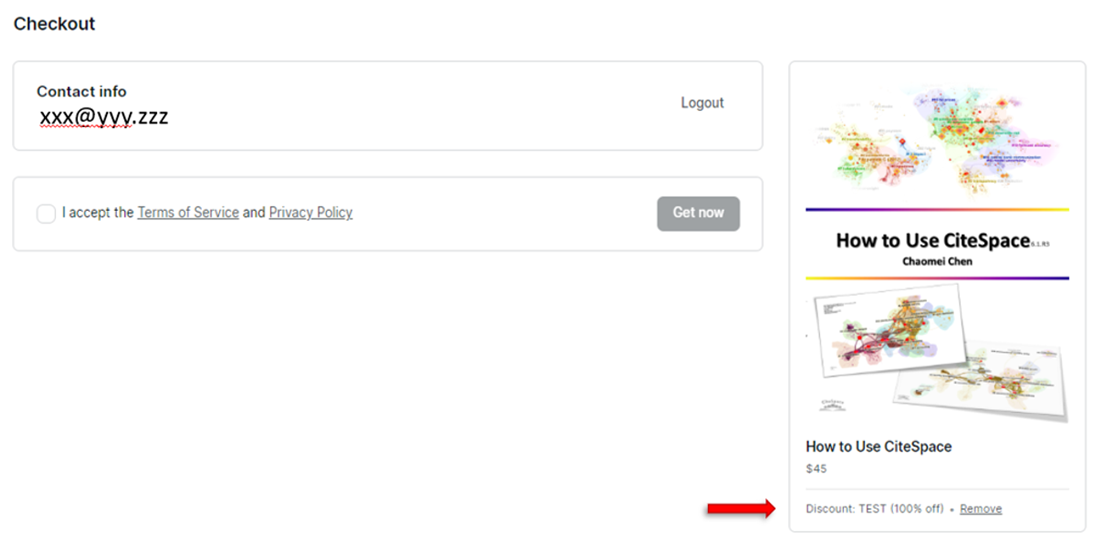
Accept the terms of service and privacy policy (this is part of the podia website; it is not specifically to do with CiteSpace) to enable the Get now button. If the checkbox cannot be selected, remove the coupon code and enter it again manually.
下个页面如下图所示。核对一些右下角箭头所指处显示的是你的优惠码。选择 I accept the Terms of Service and Privacy Policy 以后, Get now 按钮会激活。继续即可。如果这时不能选择,按红色箭头所指处,点 Remove ,然后手动逐字打入你的优惠码。
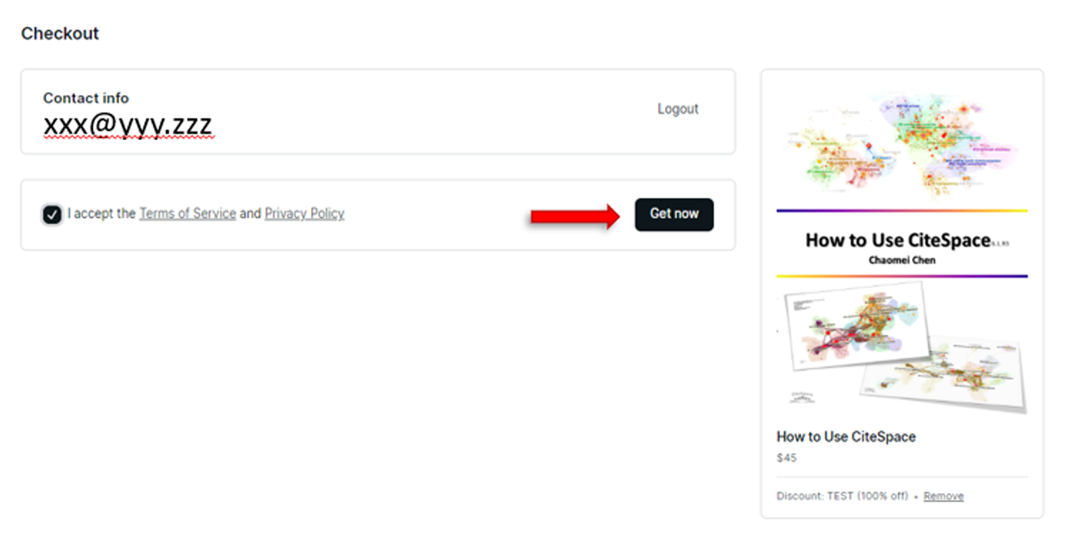
If you can see the page below, you can proceed to download files. It is a good idea to download specific files you need rather than using the download button, which will download all the files altogether, which is usually unnecessary.
如果看到下面的页面,就可以下载文件了。注意:最快捷的办法是直接下载具体文件,而不是用download按钮一次下载所有文件。
Invoice 发票
Invoices can be issued with the following information: your institution name, its tax ID, your name, email address, and details of purchase. Please contact info.citespace@gmail.com
如果需要开具发票,请将下列信息提供给info.citespace@gmail.com
单位名称
税号
姓名
邮箱地址
付款金额,日期
You should only download CiteSpace and its updates from your own Podia account on citespace.podia.com.
Free versions are downloadable from https://sourceforge.net/projects/citespace/
Any other websites or online stores distributing CiteSpace are unauthorized.
Warning: Pirate copies from Taobao and other unauthorized websites have been tempered and they are highly risky.
注意只从你自己的Podia账号下载 CiteSpace 正版。任何其它渠道均未授权。
盗版软件是侵犯知识产权的违法行为。盗版软件可能而且已经发生被植入恶意软件,病毒等危险行为,对用户自己的电脑,个人隐私,及安全带来威胁。请大家务必注意以避免风险和损失。
实例如下,盗版软件删掉了用户电脑上的文件:


淘宝店销售盗版软件也触犯刑法
摘要:淘宝网店等销售盗版,未经著作权人许可,发行其软件作品,其行为均已构成侵犯著作权罪。
挖矿木马伪装成盗版软件攻击Mac电脑
摘要:很多用户存在一个误区:盗版软件经济实惠,用起来和正版软件没什么区别。实际上,这是用户在拿自己的电脑设备、个人隐私来冒险。盗版软件不但在产品功能和安全性、运行稳定性上低于正版软件,更有可能是承载恶意软件、病毒的主要介质。
谈谈盗版软件问题
摘要:盗版让我们有机会接触到更多更好的付费软件,但是也让程序员的劳动价值被轻易窃取,知识产权变成无稽之谈。
CiteSpace has been actively maintained and constantly evolving over two decades. This has become a distinct character of CiteSpace and a long-lasting commitment to users in the CiteSpace community.
Major reasons and changes include:
updates due to changes in third-part data formats
optimizations to improve performance and user experience
integrating new technologies such as GPT API to enhance the capabilities of CiteSpace
bug fixes and upgrades
20多年来,CiteSpace 一直在积极维护并持续发展。这已成为 CiteSpace 的独特的传统之一,也是对 CiteSpace 用户的长期支持。
主要原因和变化包括:
新版有更强的数据识别和处理能力
由于第三方数据格式变更而进行的更新
性能优化以提升用户体验
集成新技术,如 GPT API,以增强 CiteSpace 的功能
根据用户的反馈以及各个数据输出格式的更新换代等
修复漏洞,以及升级
以及提高安全保护以防范各种恶意盗版行为
总之,尽量以新版结果为主,可以参考 Summary Report 报告里的表格等辅助信息来帮助论文修改。
Compatibility
Use the Save Visualization function to store the current visualization so that you can open and edit it with more recent versions.
兼容性
建议用 Save Visualization 保存可视化结果,这样可以用更新后的版本打开原有的可视化文件。
In general, you should not store user files under the installation folder unless you backup your user files regularly, as they may be unintentionally removed by the uninstallation process.
用户自己的数据文件最好不要存在安装文件夹之内以避免今后卸载时误删数据文件。
As shown in the example below, when you select an existing folder test1 for the installation, the installer will remind you this is an existing folder. What it really means is this: everything in the test1 folder will be gone if one day you run the uninstall command. The good practice is: 1. always choose a new folder and 2. store your user files outside the installation folder. 3. if you really want to store your files under the installation folder, backup them elsewhere routinely.
Control Panel > Programs > Programs and Functions > CiteSpace (Uninstall)
注意:你指定的安装文件夹如果已经存在,安装是会保留现有文件(见下图)。但是,卸载时整个安装文件夹会被安装包删除。这是所有安装包的标准定义。所以最好不要在安装文件夹内存放新文件,至少要另做备份。
如下图所示,安装文件夹为 test1, 安装前内含 test2, test3, new1.txt (8:46 AM)。安装后 这些文件夹、文件仍然保留(8:48 AM)。但是卸载 (从control panel uninstall) 则会删除整个安装文件夹 test1。

3. 下载和安装
CiteSpace is available for Windows, Mac, and Linux. Login to your Podia account and choose the corresponding installer accordingly to download.
Login to your Podia account. Go to the Products page.

On the Products page, find your product. Click into it.
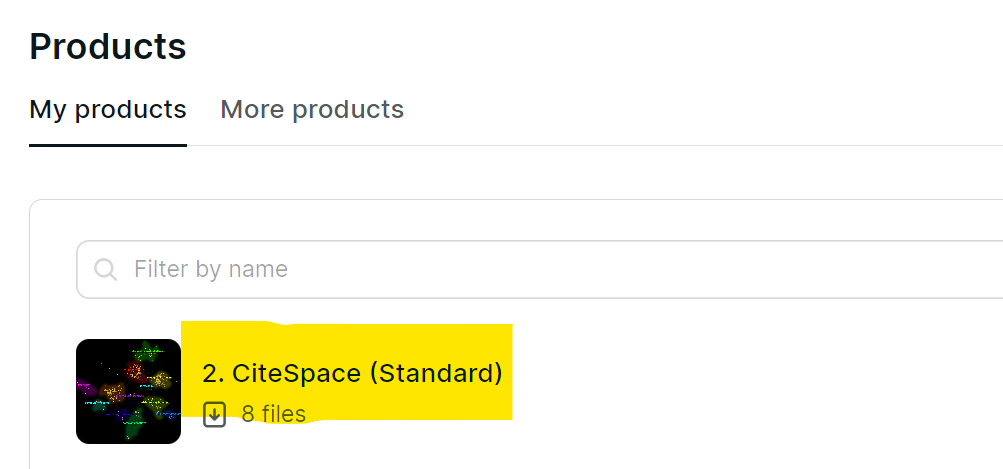
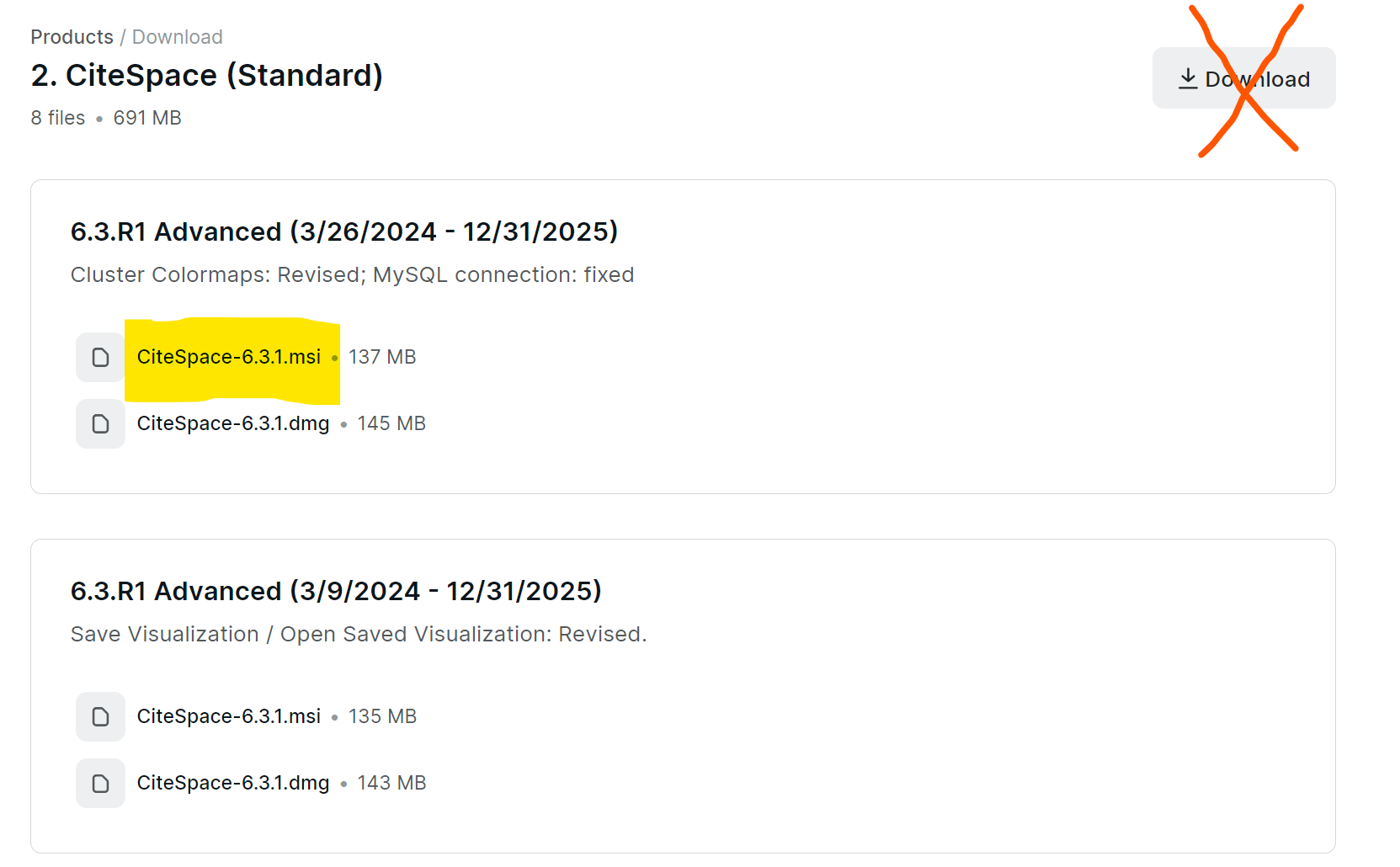
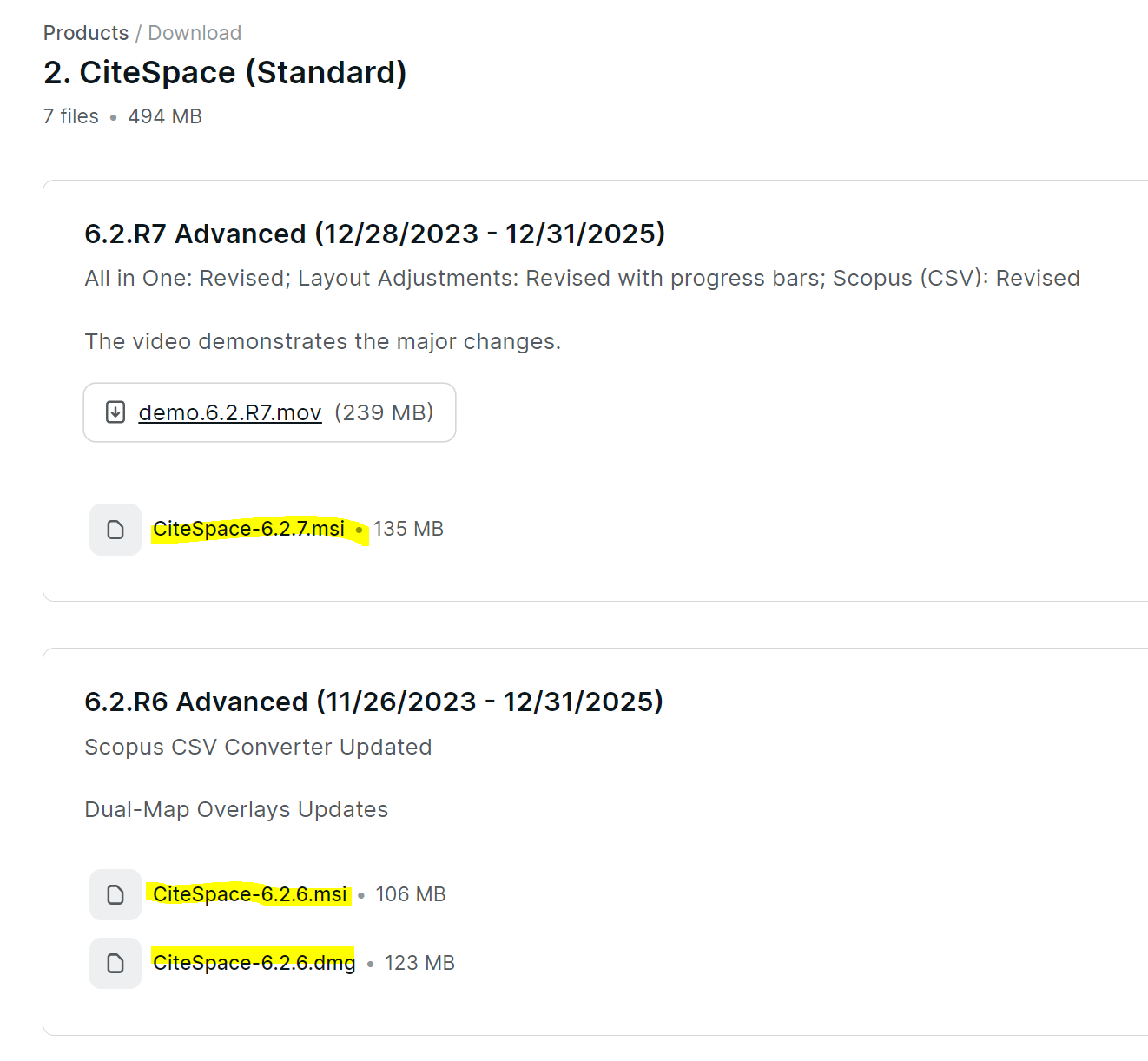
You will see a list of files, including installers for Windows, Mac, and Linux. Click on the specific installer file to download. Note: Do not use the Download button. The Download button will attempt to download ALL the files available to your subscription, which would be unnecessary and, more importantly, if it may lead to a timeout.
下载安装文件
如下图所示,直接点击黄色标出的文件。如果是 Windows,下载 exe 或msi 文件;如果是 Mac,下载 dmg 文件。注意:不要点击"Download"按钮,因为那会试图下载你账户下所有可供下载的文件,很容易导致超时。
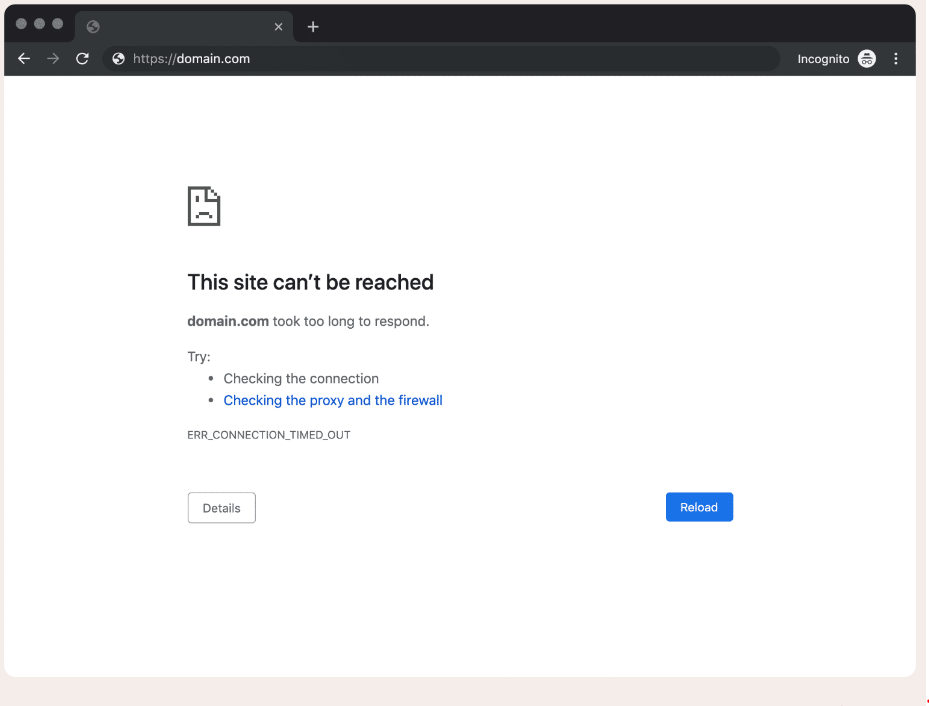
Users from some locations may experience network throttles imposed by local Internet providers, restrictions from campus networks, or other restrictions on Internet access. You may try a different Internet connection, use the hotspot of your mobile phone, or use a VPN. You should also check your firewall settings.
有些用户有时会遇到超时或网页无法访问的问题。具体原因包括网络限流或拦截或使用代理服务器有关。建议先试试使用手机热点,变更联网方式,VPN,检查防火墙和杀毒软件是否拦截或屏蔽podia网站等方法(参考下面具体步骤),如果仍有问题, 联系info.citespace@gmail.com并提供相关信息,包括操作系统等相关信息。
Here are a few step-by-step tutorials on how to fix the problem:
https://www.ghacks.net/2022/07/02/how-to-deal-with-microsoft-edges-isnt-commonly-downloaded-warning/
Downloads reported as unsafe by Microsoft Defender SmartScreen can be downloaded by using the following steps:
Copy the web address (URL) of the download or the page that hosts the download link.
Open Internet Explorer 10 or Microsoft Edge on the desktop.
Paste the URL into the address bar and hit enter. If the URL was to the page hosting the download, click on the desired download link on that web page.
When the Microsoft Defender SmartScreen block is shown, click View Downloads.
In the IE10 or Microsoft Edge Download Manager, right-click on the download and choose Download unsafe file.
When the file download is complete, it can be launched by right-clicking on the item again and choosing Run anyway.
When you try to install or uninstall an application such as CiteSpace on Windows, your installation or uninstallation may fail and you will see error messages similar to the following:
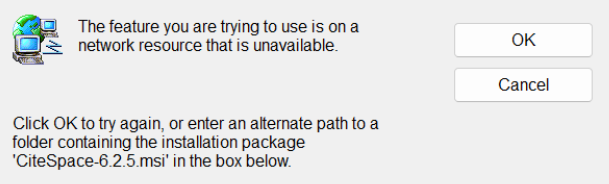

The issue is most commonly due to a failure of the Windows Installer service on your computer. The following link is a good source of steps to fix this problem:
Here is a video.
安装或卸载时如果遇到上图所示问题,很可能是你的电脑上Windows Installer service 没有正常工作。请按照上面链接里的步骤检查修复。
CiteSpace 7.0.1 is available for two types of chips on Mac: arm64 (Apple chips M1-M4) and x86-64.
First, verify whether your Mac is supported.
Open a Terminal window (Command + space, type Terminal, press Enter)
Type the command below, then press the Enter key:
uname -m
If you see arm64 of x86-64, then it is supported. Make sure you download the correct version. For arm64, for example, you should download citespace-macos-arm64.dmg.
If your Mac prompts you with a message similar to this:
“CiteSpace" is damaged and can't be opened. You should move it to the Trash.
You can solve the problem as follows.
1) Press the "Cancel" button.
2) Open a Terminal window and enter the following two commands one by one:
cd /Applications
sudo xattr -dr com.apple.quarantine CiteSpace.app
Then you should be able to open the CiteSpace.app.
Further readings
If you get the error like the following,
xattr: [Errno 1] Operation not permitted
you may follow the steps here.
If you still cannot run CiteSpace, go to settings > Privacy and Security > Security. You should allow CiteSpace there.
CiteSpace 当前的 mac 版本 支持 Apple 芯片(M1 / M2 / M3 / M4,arm64) 和 x86-64。
打开 终端(Terminal)
Finder → 应用程序 → 实用工具 → 终端
或者按 Command + 空格,输入「终端」,回车
在终端中 复制并粘贴下面这行,然后按回车:uname -m
如果显示:arm64 → 下载arm64版
如果显示:x86_64 → 下载x86-64版
不要双击
正确方式:
在 Finder 中找到 citespace
右键点击
选择 “打开(Open)”
弹出安全提示时,再次选择 “打开”
这是 macOS 对“非 App Store 程序”的正常安全机制
No.
This question is concerned with the Advanced version only. You can still use CiteSpace without MySQL。
这个问题仅涉及高级版。而且没有 MySQL 也可以使用 CiteSpace。
Which version of MySQL is supported?
CiteSpace currently works with MySQL Server 8.0.
'MySQL server is running with the --secure-file-priv option.'
First, find the my.ini file used by your MySQL. Start a MySQL command line client and use the following query:
SHOW VARIABLES LIKE 'pid_file';
You may see something similar to:
C:\ProgramData\MySQL\MySQL Server 8.1\Data\...pid
You should edit the my.ini file under C:\ProgramData\MySQL\MySQL Server 8.1
Make the following changes in the my.ini file and restart MySQL server.
secure-file-priv=""
“MySQL 服务器正在以 --secure-file-priv 选项运行。”
在 MySQL 的 my.ini 文件中进行以下更改并重新启动 MySQL 服务器。
secure-file-priv=""
”OS errno 13 - Permission denied“
Windows: services > MySQL service
Right-click on your MySQL service
Properties > Log On > Log on as: Local System account
“OS errno 13 - 权限被拒绝”
Windows:services > MySQL80
右键单击 MySQL80
Properties > Log On > Log on as: Local System account
Here are two videos (in Chinese) on relevant topics:
这里有两个相关视频(中文):
https://www.bilibili.com/video/BV1qA4y1976H?share_source=copy_web&vd_source=22bbb347bb8d67ef942ba5a57f76efb1
https://www.bilibili.com/video/BV1BT4y1r783?share_source=copy_web&vd_source=22bbb347bb8d67ef942ba5a57f76efb1
4. 启动
如果闪退,检查安装路径中是否包括中文字符,很多情况下将中文字符改为英文字母后可以解决。
CiteSpace 6.4.R2 requires PowerShell 5.1 or higher. Open a PowerShell window and check its version with the following command:
$PSVersionTable.PSVersion
If its version is below 5.1, you need to upgrade it to 5.1.
CiteSpace 6.4.R2 需要PowerShell版本至少为 5.1。打开PowerShell窗口,用下面的命令检查你PowerShell的版本:
$PSVersionTable.PSVersion
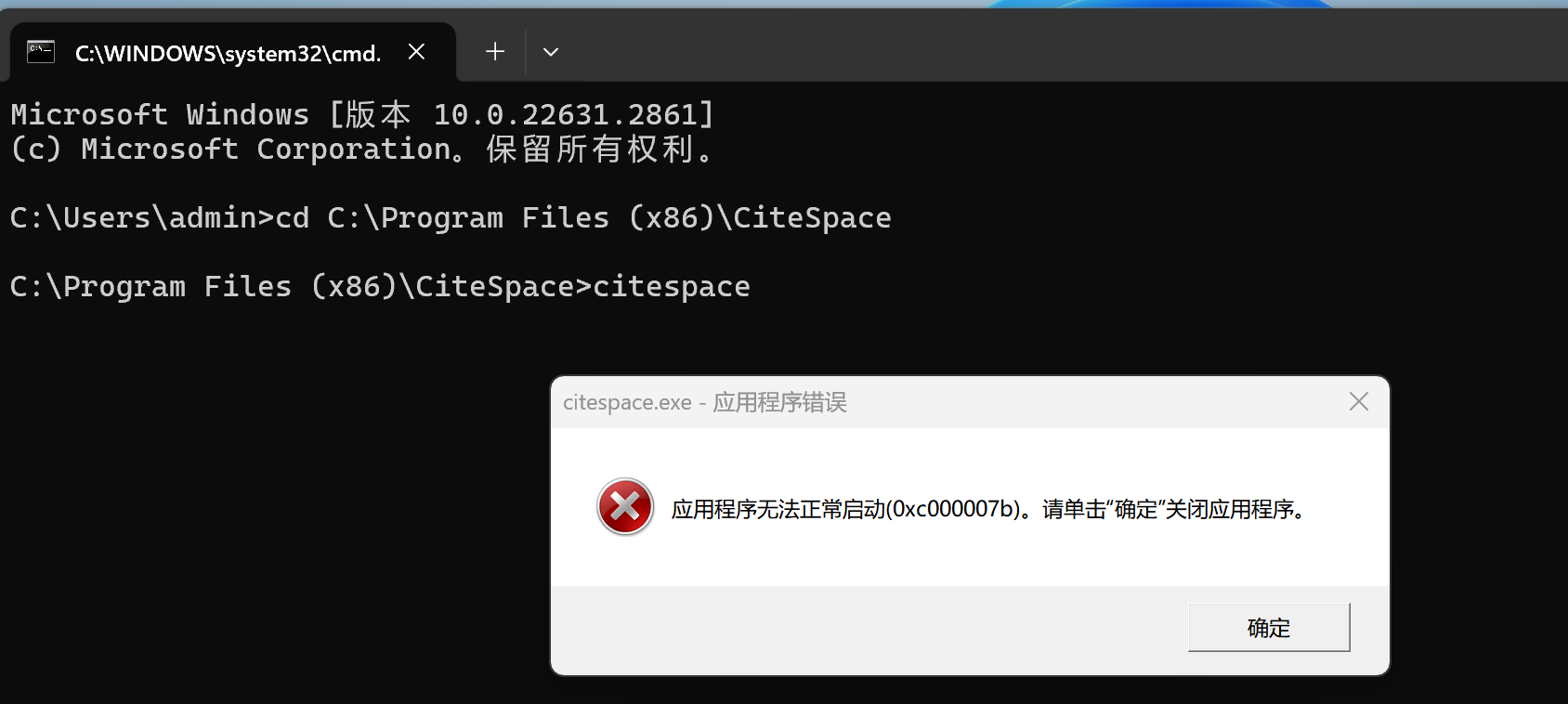
如果仍有问题,打开命令行窗口,找到CiteSpace的文件夹后,从命令行窗口里启动CiteSpace。将出错信息截图, 在 Podia 上的留言及评论区报告具体出错信息。
系统编码不匹配。用户系统编码为936或其他编码,而CiteSpace使用UTF-8。

按下列步骤可以解决这类问题:
系统层面开启全局 UTF-8
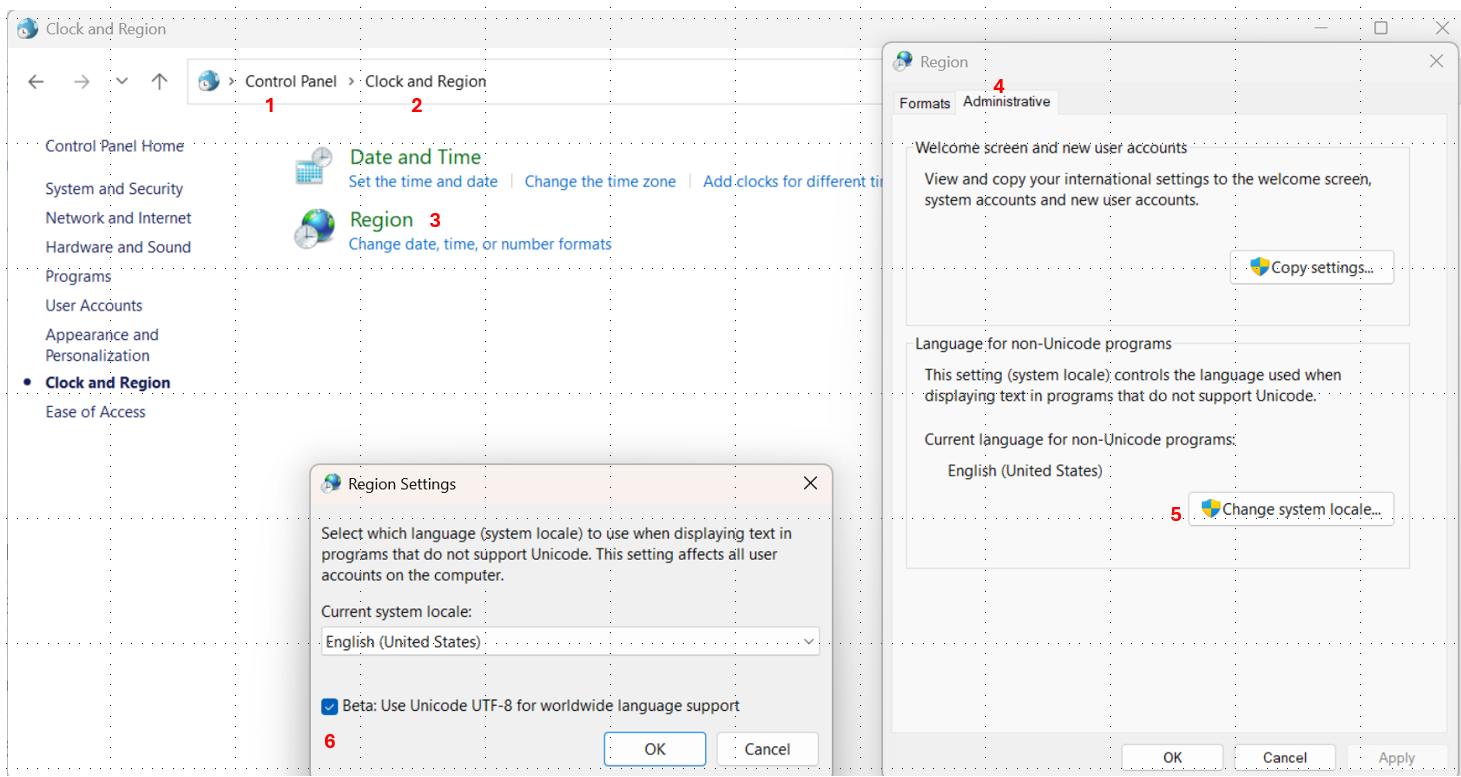
打开「控制面板 → 时钟和区域 → 区域 → 管理 → 更改系统区域设置」
勾选“使用 Unicode UTF-8 提供全球语言支持(Beta)”
重启电脑
这样 Windows 整个 ANSI 接口都使用UTF-8,与CiteSpace匹配。
You may set Region Settings as follows to use Unicode UTF-8 for worldwide language support. Go to Control Panel -> Clock and Region -> Region -> Administrative > Change system locale > Beta: Use Unicode UTF-8 for worldwide language support. Then restart your computer.
If you encounter the following issue, check if you have Microsoft Visual C++ redistributable installed properly.
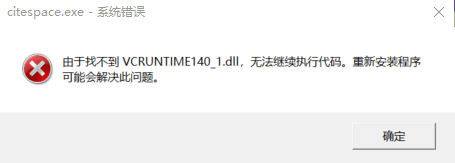
CiteSpace 的运行程序需要一些系统支持文件。如果您的电脑没有安装这些文件,会导致启动失败。
下载后双击安装(如果提示已有安装,可以点击“修复”)。
安装完成后,重新启动电脑。
再次尝试运行 CiteSpace。
On the upper-right corner of the welcome page of CiteSpace, there is a button “English", meaning English will be the working language of the user interface. To toggle between "English" and "Chinese", press the button accordingly.
启动后第一页的右上角的“English"按钮。点击 “English", 就会切换到中文, 如果要换回英文,重新启动即可。
To activate, launch CiteSpace, agree the terms, enter the email address associated with your subscription. You may set your email address as an environment variable CiteSpace so that you don't have to enter your email address each time.
激活
启动 CiteSpace,输入你相关联的电子邮箱地址。如果验证成功,CiteSpace 将在该电脑上激活。
为了避免每次启动 CiteSpace 时,都需要输入邮箱地址,设置环境变量CiteSpace。
Set Enviroment Variable:
control panel
system and security
system
advanced system settings
environment variables
user variables
new user variable
variable name: CiteSpace
variable value: your email address
OK all the way out.
设置环境变量步骤如下:
control panel
system and security
system
advanced system settings
environment variables
user variables
new user variable
variable name: CiteSpace
variable value: your email address
OK, OK, OK, ...
Spelling 检查拼写(包括大小写)
Make sure your email address is entered correctly. It is case sensitive.
正确输入邮箱地址。注意区分大小写。
Connection 网络通畅
Make sure your network connection is stable and your firewalls do not block CiteSpace.
Try to connect through different ways, e.g., via your cellphone's hotspot.
联网方式与防火墙设置
确保网络连接稳定,防火墙没有拦截等等。尝试其他联网方式,如通过手机热点等等。
5. 数据收集
6. 预处理
CNKI data format does not include cited references. It means the data is insufficient for a document co-citation, although you can generate a network of cooccurring keywords.
CNKI 数据格式不包括引用的参考文献。这意味着数据不足以用于文档共引,尽管您可以生成一个共现关键字网络。
The format of a CNKI record:
RT Journal Article
SR 1
A1 瞿媚;赵璟;
AD 西南林业大学经济管理学院;
T1 心理契约维度与企业员工离职关系研究
JF 中国林业经济
YR 2012
IS 05
OP 57-61
K1 心理契约;心理契约维度;员工满意度;离职倾向
psychological contract;psychological contract dimension;employee satisfaction;turnover intention
AB 对于企业员工来说,他们工作的有效性、工作满足感的程度,以及能否一直对企业保持责任感、忠诚心,主要取决于双方心理契约的实现过程。从心理契约组织责任与员工责任维度来探讨心理契约与企业员工离职之间的关系,了解心理契约各个维度及工作满意度对离职倾向的影响程度。引入心理契约的相关理论,通过设计有针对性的调查问卷,提出假设,进行实证研究验证假设:心理契约中组织及员工的责任各维度对员工满意度存在正向影响,对员工离职意向具有负向影响。根据实证研究结果,提出了构建企业与员工良好心理契约关系的具体措施,为企业人力资源管理的实际工作提供一定的指导。
SN 1673-5919
CN 23-1539/F
LA 中文;
DS CNKI
DO 10.13691/j.cnki.cn23-1539/f.2012.05.017
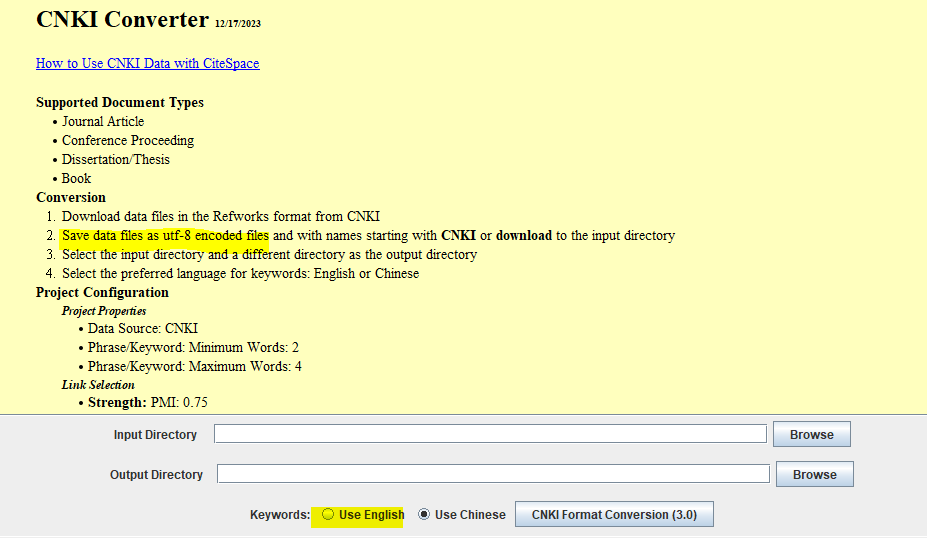
This format needs to be converted before you can use it with CiteSpace. Note that it is quite common to find ill-formatted data in CNKI. CiteSpace will report the name of the file and the line number and a copy of the line when it encounters an unexpected format. You may have to make corrections manually.
这种格式需要先转换,然后才能与 CiteSpace 一起使用。请注意,在 CNKI 中发现格式错误的数据是很常见的。 CiteSpace 在遇到非预期的格式时会报告文件名和行号以及行的副本。您可能需要手动进行更正。
如果出现乱码,检查下面提示的utf-8等步骤:
Here are a few examples reported by CiteSpace:
Unexpected format: line 8009 in CNKI-4.txt
line 8009: A1 张一弛,李书玲,刘鹏,邓建修
The expected A1 field contains author names, separated by ';', but in this case, they are separated by ','.
Here is another example:
A1 Balogun,, Anthony G.;;Adetula, Gabriel A.;;Olowodunoye, Stella, A.
Not only authors are separated by two ';'s, the same author's last name is separated from the first name by two ','s. Furthermore, the last author's last name is separated from the rest of it with a comma, but there is an extra comma between the first name and the initial. These are just a few examples of problematically formatted CNKI data that users will have to deal with before they can run CiteSpace such datasets.
以下是 CiteSpace 报道的几个例子:
Unexpected format: line 8009 in CNKI-4.txt
line 8009: A1 张一弛,李书玲,刘鹏,邓建修
预期的 A1 字段包含作者姓名,以“;”分隔,但在本例中,它们以“,”分隔。
这是另一个例子:
A1 Balogun,, Anthony G.;;Adetula, Gabriel A.;;Olowodunoye, Stella, A.
不仅作者由两个“;”分隔,同一作者的姓氏与名字也由两个“,”分隔。此外,最后一位作者的姓氏与其余部分用逗号分隔,但名字和首字母之间又有一个额外的逗号。这些仅仅是几个例子,类似的格式问题在 CNKI 数据里很常见,用户在使用 CiteSpace 之前必须处理好这些问题。
Here is a step-by-step guide for handling CNKI data with CiteSpace.
In a nutshell, search in CNKI and export the results in the Refworks format. Then use CiteSpace to convert the Refworks files.
When you set up a project with CNKI data, check the radio button for CNKI as the data source.
To construct a keyword network, consider to use PMI as well as cosine as the link selection criteria. You may also consider using MST as one of the pruning methods to reduce the number of links further.
这是使用 CiteSpace 处理 CNKI 数据的分步指南。
一言以蔽之,在知网中搜索,将结果导出为Refworks格式。然后使用 CiteSpace 转换 Refworks 文件。
当您使用 CNKI 数据设置项目时,选中 CNKI 作为数据源的单选按钮。
要构建关键字网络,可以考虑使用 PMI 以及余弦作为链接选择标准。您也可以考虑使用 MST 作为修剪方法之一,以进一步减少链接数。
Data files downloaded from Scopus need to be converted in CiteSpace before you can use them.
An uncommon but hard to detect issue is the encoding of your data files. The encoding should be pure utf-8. However, if your data file has the utf8 BOM encoding, which includes invisible utf chars () at the beginning of the file, it will mess up the conversion. This is easy to fix it by opening the file with notepadd++ and select utf-8 from the Encoding menu and save the file.
From 6.2.R6 (Advanced), you can run the conversion from Scopus CSV exports directly without worrying about the BOM encoding as the converter takes care of it.
Currently, it is recommended to use the CSV as the export format from Scopus due to issues with RIS exports from Scopus, especially in terms of missing references.
CiteSpace shows the layout process as the network is getting settled to an optimal configuration. During the process, the background color is black. Once it is done, the background color becomes white. You can stop the process as soon as the main structure becomes relatively stable.
Use the All-in-One button to show clusters with summarization labels. In addition, the function optimizes the layout.
Alternatively, you may take a step-by-step approach:
Clusters > Find Clusters
Clusters > Show Clusters' k-cores
Clusters > Optimize Layout
Cluster labels are automatically generated by CiteSpace based on the most representative articles that cite members of a given cluster.
If your data contains titles of cited references, such as in Scopus and Dimensions, cluster labels can be extracted from titles of cited articles in a cluster.
聚类标签由 CiteSpace 根据对应该聚类的最具代表性的施引文献自动生成。
如果数据中包括被引文献标题,如 Scopus 或者 Dimensions 数据,CiteSpace 也可以从被引文献的标题中提取聚类标签。
Users may change the label of a cluster by editing a tab-delimited file under the project folder: cluster_labels.tsv. The file should contain two columns: the cluster ID and the new label of your choice, separated by a tab.
用户定义的聚类标签
用户可以编辑项目文件夹下的制表符分隔文件来自行定义聚类标签:cluster_labels.tsv。该文件的格式每个聚类的标签定义为一行,两部分以制表符分开: Cluster ID 和自行定义的新标签。
You may generate cluster labels and summaries by using OpenAI GPT API in CiteSpace. Then you may switch back and forth between the GPT-generated and the original CiteSpace-generated or user generated labels. With data from Scopus and Dimensions, you can also generate cluster labels based on titles of cited references as well as titles of citing articles. The reference-based labeling is not available for data from the Web of Science as the standard Web of Science format does not contain titles of cited references. You can switch to different GPT models and 8 different languages. Current, three GPT models are accessible via CiteSpace: gpt-4o. Earlier versions support gpt-4-turbo, and gpt-3.5-turbo. Similarly, in earlier version you may use Ollama models such as llama3 and gemma:2b, either with Ollama on your localhost or on a remote server.
For a brief demo, see a recorded video here.
GPT 定义的聚类标签和概要
您可以通过集成在CiteSpace中的OpenAI GPT API来生成聚类标签和概要。然后,您可以在GPT生成的标签和CiteSpace生成的或用户生成的原始标签之间来回切换。使用Scopus和Dimensions的数据,您还可以选择基于被引用参考文献的标题以及引用文章的标题生成聚类标签和概要。基于参考文献的选择不适用于Web of Science的数据,因为标准的Web of Science格式不包含被引用参考文献的标题。您可以切换到不同的GPT模型和8种不同的语言。目前,通过CiteSpace可以访问三种GPT模型:gpt-4o。前面几个版本支持 gpt-4-turbo、和 gpt-3.5-turbo。此外,6.4.R2 之前的版本也支持 Ollma 模型如 llama3 或 gemma:2b 等,通过 localhost 或其他地址。
有关演示,请参阅视频部分。
Set up and Cost
To use the GPT button, users need to obtain your own GPT API key and set an environment variable OPENAI_API_KEY with your key as its value. Be aware of the API usage cost, which is charged by OpenAI, not CiteSpace. The single use of this function may cost about $0.05 based on the default setting. You may select gpt-4o, gpt-4-turbo, or gpt-3.5-turbo.
设置和花费
GPT 定义聚类标签功能需要用户自己先从 OpenAI 获取 GPT API 密钥,并以密钥为值设置环境变量 OPENAI_API_KEY。请注意 API 使用费用,这是由 OpenAI 而非 CiteSpace 收取的。
API Rate Limit 速率限制
The summarization function in CiteSpace is subject to the RPM and TPM associated with your OpenAI API account. In CiteSpace, you can set RPM accordingly to match the Tier of your account with OpenAI API. See my blog for more details.
For more details on RPM and TPM, see https://platform.openai.com/docs/guides/rate-limits/overview
It is strongly recommended to save the visualization as a JSON file by selecting Visualizations > Save Visualization. This allows you to reopen the saved visualization later via Visualizations > Open Saved Visualization and continue exploring it. This feature is especially useful if you want to open the visualization in a newer version of CiteSpace for further analysis or presentation.
最好通过菜单 Visualizations > Save Visualization 将可视化图谱保存为 JSON 文件。这样,以后可以通过 Visualizations > Open Saved Visualization 打开该图谱并继续进行微调。将来也可以用更新版的 CiteSpace 打开已有图谱以进行进一步分析或展示时。
You can also export the visualization as a website—that is, as a folder of files that can be hosted on a web server. This allows anyone to view and interact with the visualization directly through a web browser, without needing CiteSpace. You can also open the visualization on a local machine using a lightweight web server, such as:
python3 -m http.server您还可以将可视化图谱导出为一个网站形式的文件夹,即一组可以部署在 Web 服务器上的文件。这样,任何人都可以通过普通的网页浏览器查看和交互操作图谱,而无需安装 CiteSpace。您也可以在本地计算机上使用轻量级的 Web 服务器打开这些文件,例如:
python3 -m http.serverLandscape Visualization
The visualization shows a field of research or a topic as a whole based on your underlying dataset.
The holistic structure shows how various integral clusters evolve over time.
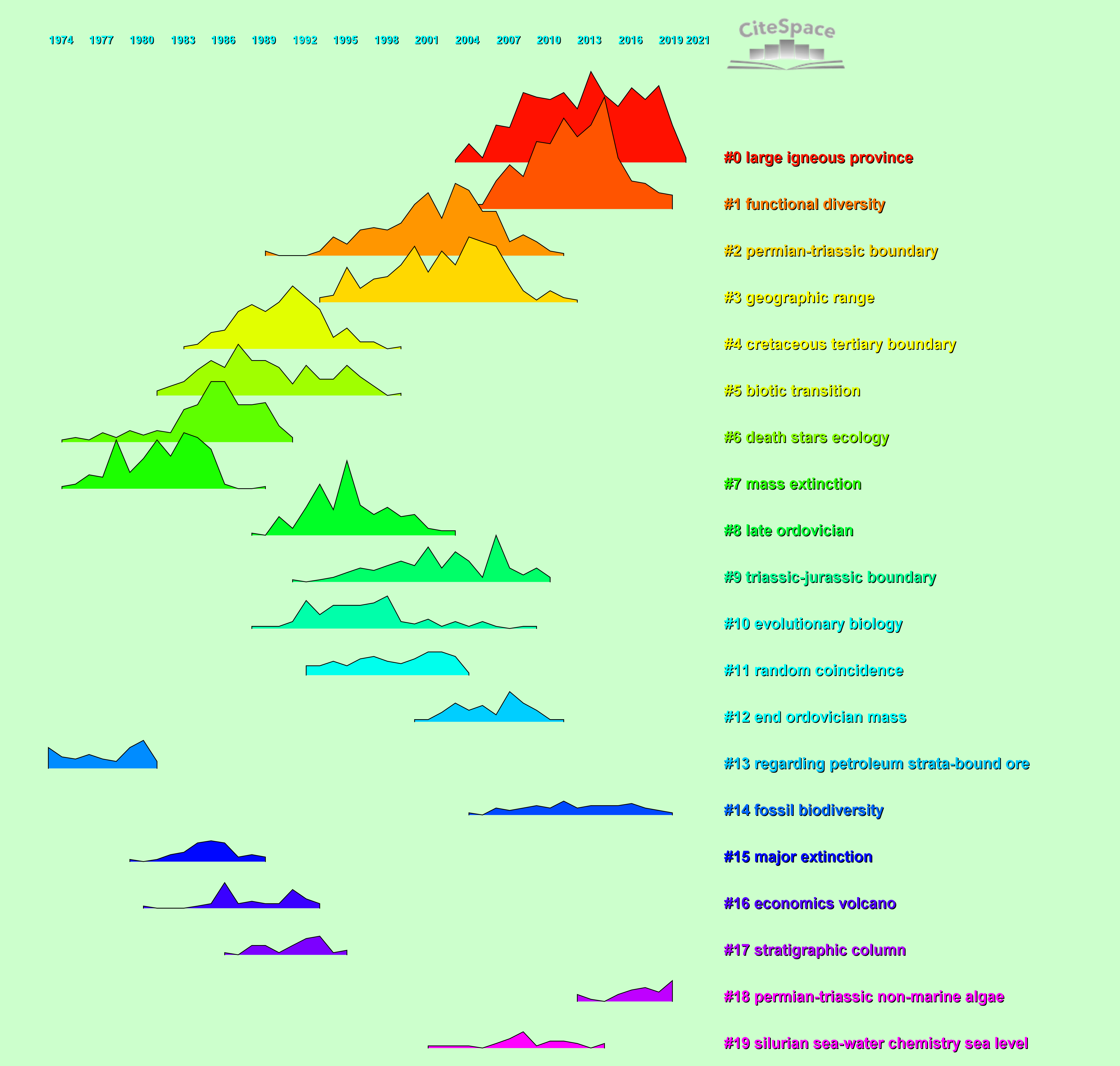
Each cluster is depicted with the following information: when did it start, how long did it last, and when did it end, or is it still active? The height of a peak indicates the volume of members of the cluster published in the corresponding year, which indicates the level of activeness of the cluster.
Pay attention to these visual features and focus on the following questions:
Which clusters are the pioneering ones? Those with the leftmost starting time. What are they about? See their cluster labels.
Which clusters have been the most active ever? Those with the highest peaks.
Which clusters are the most persistent? Those with the longest time span.
Which clusters are still ongoing today? Those extending to the most recent years.
Landscape View 解读要点:
1. 整个图表现的是一个领域或主题的整体结构
2. 整体结构细分为各个聚类,每个聚类开始,持续,结束的时间。山峰的高矮表示聚类的活跃程度。
3. 哪些是最早出现的聚类?哪些是历史上最活跃的聚类?哪些是持续最长的聚类?哪些是当前最活跃的聚类?
8. 界面和显示
Here are some of the key and well-received publications on the course of the CiteSpace development.
As of 8/14/2026, according to Google Scholar, the 2004 PNAS paper that set the foundation of CiteSpace on the duality of citing and cited articles has 3,685 citations. The 2006 JASIST paper, including further developments of the visual analytic framework and two in-depth case studies verified directly with prominent domain experts, has been cited 9,604. The 2010 JASIST paper (2,534) further empowered the visual analytic workflow with comparisons to clusters labeled by human experts. The 2017 JDIS paper, with 2,759 citations, demonstrated how these analytic principles and techniques work together.
Chen, C. (2006) CiteSpace II: Detecting and visualizing emerging trends and transient patterns in scientific literature. JASIST, 57(3), 359-377.
Chen, C. (2004) Searching for intellectual turning points: Progressive Knowledge Domain Visualization. Proc. Nat. Acad. Sci., 101(Suppl.), 5303-5310.
Chen, C. (2017) Science mapping: A systematic review of the literature. Journal of Data and Information Science, 2(2), 1-40.
Chen, C. et al. (2010) The structure and dynamics of co-citation clusters: A multiple-perspective co-citation analysis. JASIST, 61(7), 1386-1409.
胡志刚 博客 陈超美教授又一力作,你要的 CiteSpace 应用的完美范文来了
Petrovich, Eugenio (2021) Science mapping and science maps. Knowledge Organization 48(7-8), 535–562.
"CiteSpace is a very powerful software and it produces aesthetically impressive visualizations. However, it needs some expertise to fully take advantage of all its features. We suggest it to advanced users who already have some skills in science mapping."
Haghani, Milad (2023) What makes an informative and publication-worthy scientometric analysis of literature: A guide for authors, reviewers and editors. Transportation Research Interdisciplinary Perspectives, 22, 100956.
https://doi.org/10.1016/j.cities.2023.104261